Testing Jakarta EE Applications: Best Practices and Tools
Jakarta EE

Modern enterprise Java applications built on Jakarta EE require a strong testing strategy to ensure they work reliably. In this post, we’ll explore key approaches and tools for effective Jakarta EE application testing, starting with the testing pyramid.
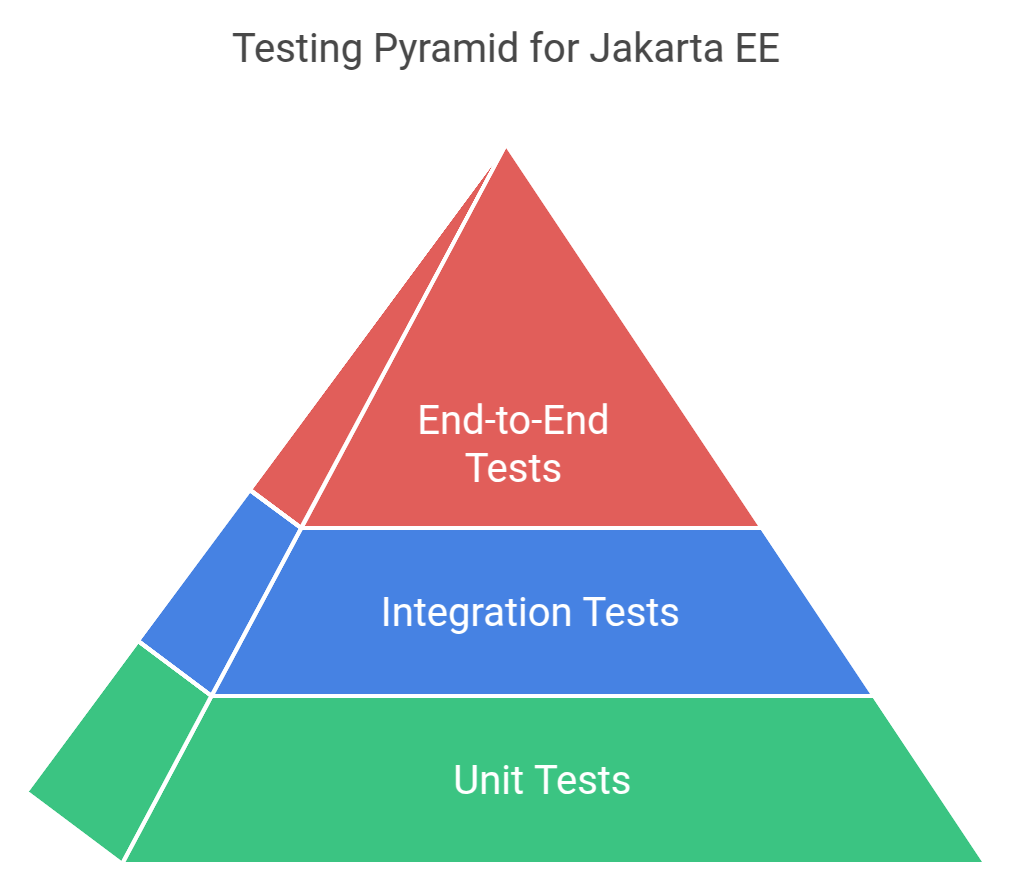
The testing pyramid offers a structured approach to organizing tests in Jakarta EE applications. This model divides tests into three distinct layers, each serving different purposes and providing specific benefits.
Unit tests form the base layer of the pyramid. These tests examine individual classes, methods and functions in complete isolation. A well-written unit test verifies a single piece of business logic or domain behavior, such as validating user input or calculating order totals. They execute quickly—typically in milliseconds—and provide immediate feedback during development. When a unit test fails, you can quickly identify the exact line of code causing the issue, making debugging straightforward.
The middle layer of the testing pyramid consists of integration tests. These tests verify how different parts of your application work together. Instead of testing components in isolation, integration tests examine the interactions between services, databases and external systems. For example, an integration test might verify that your user service correctly stores data in the database and sends a welcome email through the email service. While these tests take longer to run and need more setup than unit tests, they catch issues that unit tests cannot detect, such as database mapping problems or service communication failures.
End-to-end tests form the top layer of the pyramid. These tests simulate real user interactions with your application, verifying complete features and business workflows. They ensure that all components of your system work together correctly from a user’s perspective. An end-to-end test might walk through an entire order processing flow: from user login, through product selection, to checkout and order confirmation. While these tests require the most setup and maintenance, they provide the highest confidence that your application works as intended.
|
Test Type |
Purpose |
Setup Complexity |
Execution Speed |
Common Applications |
|
Unit |
Verify individual components |
Low |
Very Fast (ms) |
Data validation, business calculations |
|
Integration |
Test component interactions |
Medium |
Moderate (s) |
Database operations, service communication |
|
End-to-End |
Validate complete workflows |
High |
Slow (min) |
User registration, order processing |
This pyramid structure promotes a balanced testing strategy. The broad base of fast unit tests provides quick feedback during development. The middle layer of integration tests ensures components work together correctly. The smaller top layer of end-to-end tests validates complete user scenarios. When implemented properly, this approach reduces testing time while maintaining high confidence in your application’s reliability.
Consider automating all three layers and incorporating them into your continuous integration pipeline. Regular maintenance keeps the test suite valuable and relevant as your application evolves. While each layer requires different tools and approaches, together they create a comprehensive testing strategy that helps deliver quality Jakarta EE applications.
JUnit 5 serves as the foundation for testing Jakarta EE applications. Its extensions system makes it particularly well-suited for enterprise application testing. Key features that make it essential for Jakarta EE testing include:
Here’s an example of how to use JUnit 5 with the Mockito framework:
@ExtendWith(JakartaExtension.class)
public class UserServiceTest {

    @Inject
    private UserService userService;

    @Test
    void testUserCreation() {

        User user = new User("john.doe@example.com");
        User created = userService.create(user);
        assertNotNull(created.getId());

    }


    @ParameterizedTest
    @ValueSource(strings = {"admin@example.com", "user@example.com"})
    void testUserValidation(String email) {

        User user = new User(email);
        assertTrue(userService.validateUser(user));

    }


    @Test
    @EnabledIfSystemProperty(named = "test.environment", matches = "integration")
    void testUserIntegration() {

        // Integration-specific test code

    }

}
Arquillian is a testing platform for Jakarta EE applications, providing the ability to test your code inside a real application server, such as Payara Server or Payara Micro. It eliminates the need for complex mocking of container services and ensures your tests run in an environment that closely matches production.
Key benefits of Arquillian include:
Here’s an example of Arquillian in action:
@RunWith(Arquillian.class)
public class UserRepositoryIT {

    @Deployment
    public static JavaArchive createDeployment() {

        return ShrinkWrap.create(JavaArchive.class)
            .addClass(UserRepository.class)
            .addClass(User.class)
            .addClass(UserService.class)
            .addAsManifestResource(EmptyAsset.INSTANCE, "beans.xml")
            .addAsResource("test-persistence.xml", "META-INF/persistence.xml");

    }


    @Inject
    private UserRepository repository;

    @PersistenceContext
    private EntityManager em;

    @Test
    @InSequence(1)
    @Transactional(TransactionMode.COMMIT)
    public void testUserPersistence() {

        User user = new User("test@example.com");
        repository.save(user);
        assertNotNull(user.getId());


        User found = repository.findById(user.getId())
            .orElseThrow();
        assertEquals("test@example.com", found.getEmail());

    }


    @Test

    @InSequence(2)
    public void testUserQueries() {
        List<User> users = repository.findByEmailDomain("example.com");
        assertFalse(users.isEmpty());

        users.forEach(user ->
            assertTrue(user.getEmail().endsWith("example.com")));

    }

}
TestContainers has become an indispensable tool for Jakarta EE testing, allowing you to spin up real databases, message queues and other dependencies in Docker containers during your tests. This allows your integration tests to run against real services while maintaining test isolation.
Key features include:
Here’s an example of spinning up a Postgres and Redis databases:
@Testcontainers

class UserServiceIntegrationTest {

    @Container
    static PostgreSQLContainer<?> postgres =
        new PostgreSQLContainer<>("postgres:14")
            .withDatabaseName("testdb")
            .withUsername("test")
            .withPassword("test");


    @Container

    static GenericContainer<?> redis =
        new GenericContainer<>("redis:6")
            .withExposedPorts(6379);


    @DynamicPropertySource
    static void configureProperties(DynamicPropertyRegistry registry) {
        registry.add("spring.datasource.url", postgres::getJdbcUrl);
        registry.add("spring.datasource.username", postgres::getUsername);
        registry.add("spring.datasource.password", postgres::getPassword);
        registry.add("redis.host", redis::getHost);
        registry.add("redis.port", redis::getFirstMappedPort);

    }


    @Test

    void testUserOperationsWithRealDatabase() {
        // Test code using real PostgreSQL and Redis instances
        UserService service = new UserService(postgres.getJdbcUrl());
        User user = service.createUser("test@example.com");
        assertNotNull(user.getId());

    }


    @Test

    void testUserCaching() {

        // Test code verifying caching behavior with real Redis
        UserService service = new UserService(
            postgres.getJdbcUrl(),
            redis.getHost(),
            redis.getFirstMappedPort()

        );

        service.cacheUser(new User("cached@example.com"));
        assertTrue(service.isUserCached("cached@example.com"));

    }

}
For unit testing, Mockito helps isolate components by mocking dependencies. Its intuitive API and powerful verification capabilities make it essential for testing Jakarta EE applications:
@ExtendWith(MockitoExtension.class)

public class UserServiceTest {

    @Mock
    private UserRepository repository;

    @Mock
    private EmailService emailService;

    @InjectMocks
    private UserService service;

    @Test
    void testUserCreationWithNotification() {

        // Arrange
        User user = new User("john@example.com");
        when(repository.save(any(User.class)))

            .thenReturn(user);
        doNothing().when(emailService)
            .sendWelcomeEmail(any(User.class));


        // Act
        User created = service.createUserWithNotification(user);


        // Assert
        assertNotNull(created);
        verify(repository).save(user);
        verify(emailService).sendWelcomeEmail(user);
        verifyNoMoreInteractions(emailService);

    }


    @Test
    void testUserRetrieval() {
        when(repository.findById(1L))
            .thenReturn(Optional.of(new User("john@example.com")));


        User user = service.getUserById(1L);
        assertNotNull(user);

        verify(repository).findById(1L);

    }

    @Test
    void testUserRetrievalWithCaching() {

        // First call should hit the repository
        when(repository.findById(1L))
            .thenReturn(Optional.of(new User("john@example.com")));


        User user1 = service.getUserById(1L);
        User user2 = service.getUserById(1L);


        // Verify repository was only called once due to caching
        verify(repository, times(1)).findById(1L);

    }

}
Performance testing is of paramount importance for enterprise applications to ensure responsiveness and stability under diverse conditions. It involves the use of tools like JMeter, Gatling or LoadRunner to simulate realistic user interactions with the application. These interactions should include “think time” delays to accurately mimic human behavior.
When designing performance tests, it’s important to simulate concurrent users accessing the application and vary the load patterns. More specifically, gradually increasing and decreasing the load (ramp-up and ramp-down) to avoid sudden spikes is crucial. Even more, throughout the testing process, meticulous monitoring is key. Track response times, resource usage (CPU, memory, network), throughput and error rates to identify potential bottlenecks or performance degradation.
To ensure accurate and representative results, use a dedicated test environment that closely mirrors the production environment. This environment should include a realistic dataset and be monitored to ensure it doesn’t become a bottleneck itself.
Integrate performance tests into your CI/CD pipeline to catch performance regressions early in the development cycle. Establish baseline performance metrics and track them over time to identify trends and potential issues.
Finally, analyze the performance test results to pinpoint bottlenecks and optimize the application accordingly. This might involve code optimization, database query tuning or server configuration adjustments.
Effective testing of Jakarta EE applications hinges on a multi-layered approach that integrates the testing pyramid, core tools like JUnit, Arquillian, TestContainers and Mockito as well as a comprehensive performance testing strategy. This multifaceted approach helps build more reliable and maintainable Jakarta EE applications, leading to robust mission-critical applications with optimum uptime.
In addition, it is essential to bear in mind that testing is not merely about identifying bugs. It’s about fostering confidence in your codebase and ensuring your applications can evolve safely over time. Adapt these practices to your specific needs as your application grows. This will not only result in higher quality applications but also contribute to a more robust and sustainable development process.
Share:

 7 minutes
If you worked with MicroProfile Health, you already understand the value of exposing application health information through standardized endpoints. […]
 1 minute
Modern high-frequency trading (HFT) platforms operate under extreme performance constraints, processing tens of thousands of messages per second while […]
 1 minute
Earlier this week, we’ve launched the 2026 Payara Platform Community Survey and we’d love to hear from you. If […]
