Building a Modern Enterprise App with Payara: A 15-Step Journey
Jakarta EE

Learning Jakarta EE can sometimes feel like solving a puzzle. You have JPA, CDI, REST, Security, and Docker… but how do they all fit together in a real-world scenario? To answer this, I decided to build a comprehensive, open-source guide: The Jakarta EE Developer Full Path.
This project is not just a collection of snippets; it is a structured marathon consisting of 15 practical sessions. We start fro an empty folder and finish with a fully containerized microservice running on Payara Micro, covering the entire software development lifecycle.
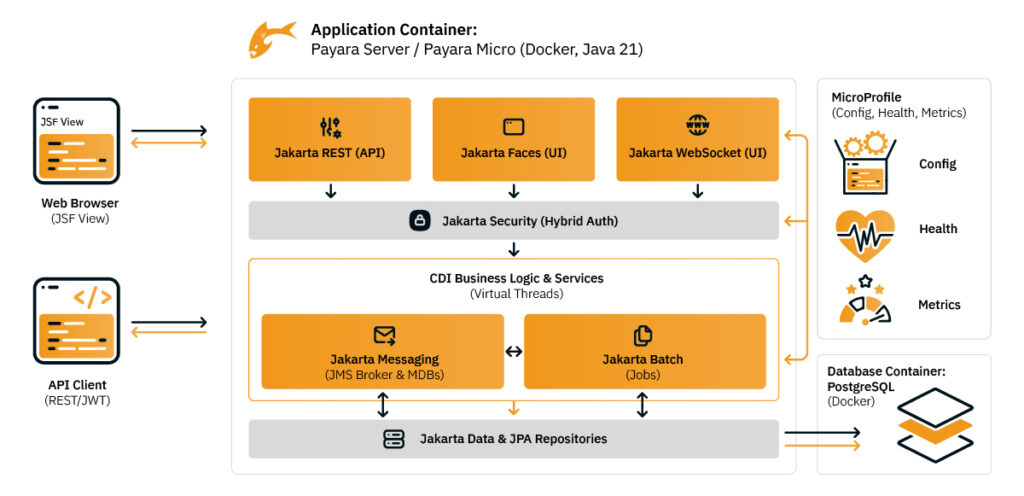
Here is what developers will find in this tutorial series hosted on GitHub.
The journey begins with the essentials. We use Payara Server Community as our runtime because of its “deployment-ready” nature.
Once the CRUD is ready, we step up the game. Real applications need more than just saving data.
A backend is nothing without a user interface. We build a functional UI using Jakarta Faces (JSF), leveraging templating and validation. We also add a “wow” factor with Jakarta WebSocket, pushing real-time notifications from the server to the browser without refreshing the page.
The last stretch of the tutorial is dedicated to modern deployment strategies. “It works on my machine” is not enough.
Every session in the repository includes the complete source code, tested and working. The repository is designed to be a livingreference, continuously updated with the latest Jakarta EE specifications and Payara versions.
Whether you are a student making your first HTTP request or a senior developer looking to modernize a legacy monolith, this pathcovers the “how” and the “why” of modern Java development.
Ready to start? Check out the full repository and start your journey today: 👉 https://github.com/apuntesdejava/jakarta-ee-developer-full-path
Happy Coding!
 7 minutes
If you worked with MicroProfile Health, you already understand the value of exposing application health information through standardized endpoints. […]
 1 minute
Modern high-frequency trading (HFT) platforms operate under extreme performance constraints, processing tens of thousands of messages per second while […]
 1 minute
Earlier this week, we’ve launched the 2026 Payara Platform Community Survey and we’d love to hear from you. If […]

